
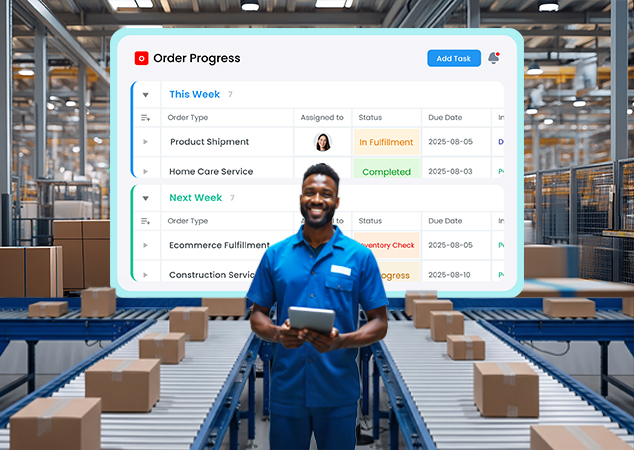
You’re juggling orders, emails, and endless to-dos, and your team is already maxed out.
Sound familiar? Instead of scrambling to hire more hands, what if you could double your output with the people you’ve got?
In this blog, you’ll see exactly how to process 2× more orders without adding headcount.
We’ll walk through real-world fixes like swapping manual handoffs for workflow automation for small businesses, and turning scattered chats into a single work management app.
Along the way, you’ll meet Jugl, our go-to communication & work management platform, built to bring clarity and speed to every step of your order flow.
Ready to make overload a thing of the past? Let’s jump in.
The Hidden Costs of Scaling by Headcount
Every hire comes with a clock attached: on average, it takes 41 days to fill a position, leaving open roles to slow your operation and stretch your team thinner in the meantime.
And those open roles aren’t free; recruitment, selection, and onboarding hard costs now average about $4,700 per hire, with some studies showing a rise from $4,129 in 2019 to $4,700 in 2023.
Dig deeper, and the sticker shock grows: you can spend $7,500–$28,000 in hard onboarding expenses, including job board fees, background checks, and initial training, before the new person even logs their first full week.
Plus, most new hires operate at roughly 25% capacity during their first month, only ramping up to full productivity around month five.
Meanwhile, every manual handoff between team members risks dropped tasks or duplicated work; just two hours of admin a day can translate to $2,000 in lost value each month. And if you’re still entering orders by hand, you’re eating into margins at about $30 per purchase order in labor and errors alone.
For actionable business hacks to further supercharge your order fulfillment, check out "Top 4 Game Changing Business Hacks to 10X Your Order Management Efficiency" which shares plug-and-play strategies to streamline every step of your operations.
That post dives into techniques like batch processing, intelligent batching rules, and real-time analytics, showing you how to squeeze maximum efficiency from each order processed.
Why Workflow Automation Is the Game-Changer
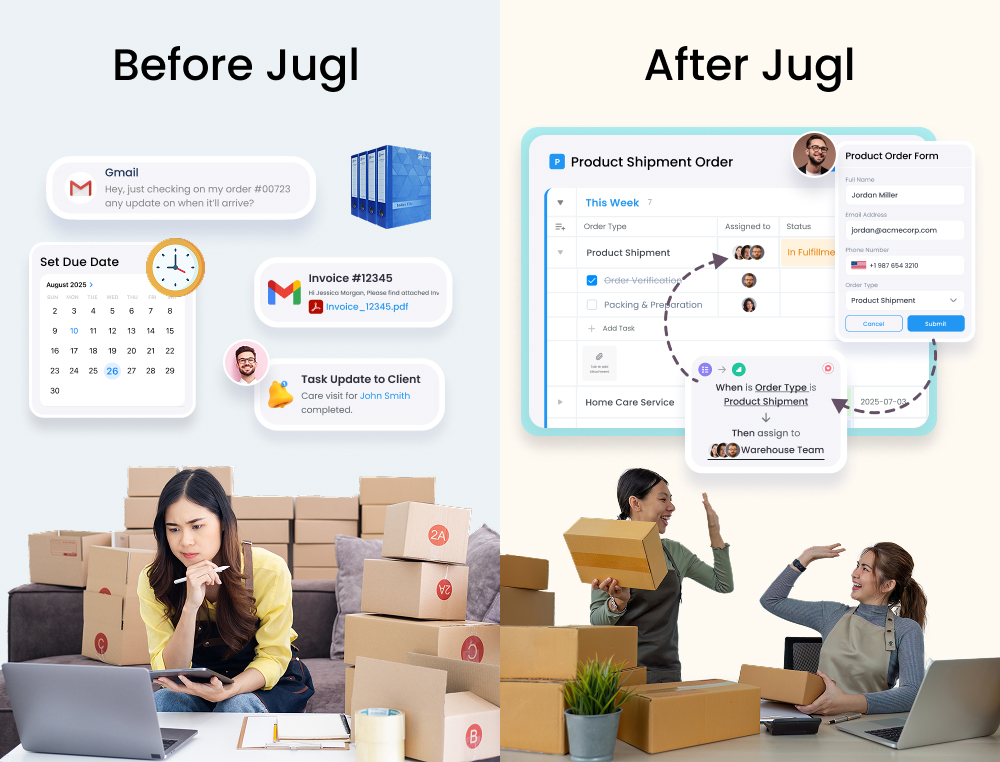
Let’s be real, chasing people down for updates, chasing down email chains, and manually moving orders from one spreadsheet to the next is a massive time sink. That’s where workflow automation for small businesses comes in.
At its core, it’s about letting software handle routine, repeatable tasks so your team can focus on the work that really matters.
What “Workflow Automation” Really Means
It's simple, in automation, you set up simple rules “when a new order comes in, create a packing task and ping the fulfillment channel,” and Jugl takes care of the rest. No more copy-pasting order details into multiple tools or hoping someone catches a message buried in Slack.
The Big Wins You’ll See
1.
Consistency: Every order follows the exact same path, so you cut down on mistakes and customer follow-ups.
2.
Speed: Automated triggers happen in seconds, no waiting for someone to notice an email or update a sheet.
3.
Visibility: You get real-time dashboards showing exactly where each order sits, instead of scrambling to collect status updates.
How Jugl Makes It Effortless
With Jugl building these “if-this-then-that” flows is as easy as dragging and dropping. You pick a trigger (like “new order received”), choose an action (such as “assign task to warehouse team”), and set any conditions (for example, “only if order value > $100”).
Once it’s live, Jugl runs these rules 24/7, freeing your people from repetitive chores and giving you peace of mind that nothing slips through the cracks.
By swapping manual handoffs for automated workflows, you’ll see orders move faster, errors vanish, and your team actually enjoys their work again, all without adding another headcount.
When you add it all up, scaling by headcount isn’t just expensive, it’s slow, risky, and ultimately unsustainable. That’s why switching to a business management app can pay for itself before your next hire even starts.
If you’re aiming to stay ahead of the curve, "7 Essential Order Management Trends Every Business Should Follow in 2025: Insights from Leading Brands & Data" highlights emerging best practices, such as AI-driven inventory forecasting and mobile-first order tracking, to ensure you’re ready for tomorrow’s demands.
Introducing Jugl: Your All-in-One Business Productivity App
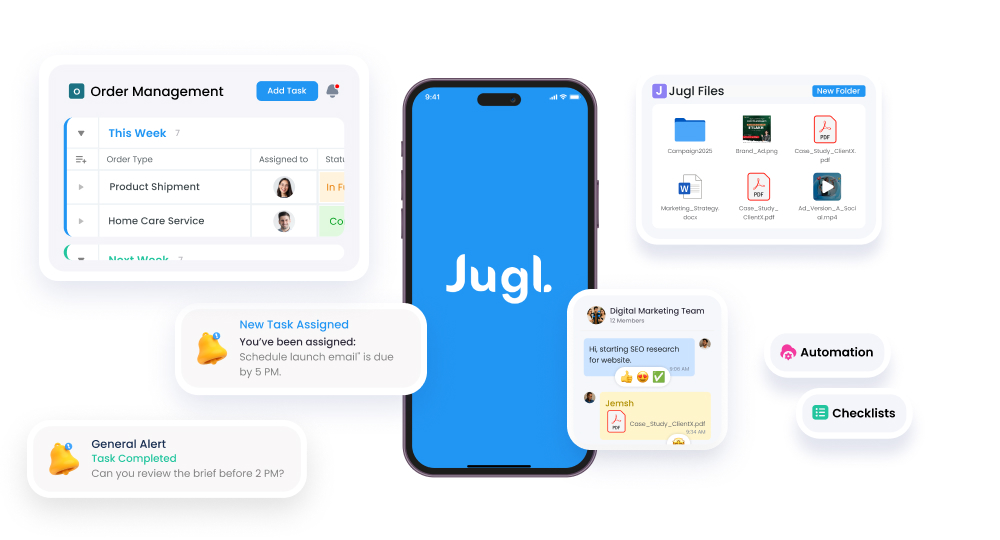
When you juggle multiple tools, one for chat, another for tasks, a third for file storage, it’s easy to lose track of what’s happening. Jugl solves that by bundling everything into a single communication & work management platform.
A Unified Workspace
With Jugl, you get a unified workspace that lets you:
Manage tasks with drag-and-drop simplicity—no more scattered to-do lists.
Track orders through a built-in order management system, complete with an External Client Share Portal so customers see real-time updates.
Chat in groups or one-on-one, making it the go-to team collaboration tool for order processing.
Store files centrally, giving every team member instant access without hunting through emails.
Key Modules That Matter
1.
Task Management: Automate recurring checklists, set due dates, and assign roles in seconds. JUGL is widely praised as the best task management app for order fulfillment because it keeps everything visible in one dashboard.
2.
Order Portal: Clients place and modify orders directly, reducing back-and-forth emails and manual entry, perfect for teams looking to streamline operations with small business workflow automation tools.
3.
Real-Time Chat & Meetings: Switch from fragmented email threads to threaded conversations and online meetings, so no detail slips through the cracks.
4.
Custom Dashboards & Reports: Build live views of order status, team workload, or SLA compliance, and export reports with a click, ideal for anyone seeking a business productivity app with automation.
Why Not monday.com or Zoho?
While monday.com scores higher on ease of use than Zoho CRM (9.0 vs. 8.2) and offers slick dashboards, it often requires third-party integrations to handle orders. Zoho’s deep customization can overwhelm small teams.
Jugl strikes a balance: out-of-the-box templates meet order workflows head-on, plus built-in chat and file storage mean you don’t have to stitch together separate apps.
With everything under one roof, task management software, employee management software for SMB, and more, Jugl shines as the truly all-in-one business app that keeps your orders, your people, and your communication perfectly in sync.
Step-by-Step: Doubling Your Order Throughput in Jugl
Ready to see how it all comes together?
Here’s a four-step playbook to process 2× more orders using Jugl as your go-to communication & work management platform, no extra hires required.
1. Map Your Current Order Process
First, get a bird’s-eye view of how orders flow today. Create a dedicated board in Jugl (think of it as your digital command center) and list every stage an order goes through, from “New Request” to “Shipped”.
As you map, note where tasks stall, whether it’s waiting on approval, manual data entry, or chasing down stock levels. This snapshot highlights your biggest bottlenecks and sets the foundation for smarter workflow automation for small businesses.
Did you know?
Companies that chart their workflows report 30% faster time-to-completion on average.

Pro Tip
Use a simple whiteboard or digital tool (e.g., Miro) to map the flow; sometimes “paper and pen” reveal redundancies that software misses.
2. Build Automated Workflows
Next, turn those manual handoffs into automatic triggers. Using Jugl’s drag-and-drop workflow builder, set rules like:
Trigger: New order submitted → Action: Create a fulfillment task and assign it to the warehouse team.
Condition: If order value exceeds $200 → route to priority queue; else → standard queue.
Did you know?
Routine automations save 10+ hours per team member each week.
Pro Tip
Start by automating your top three pain-point handoffs (e.g., order capture → task assignment). Small pilots deliver quick wins and build momentum.
Because JUGL is also a business management app, you can link order forms directly to tasks, every form submission spins up the right checklist, tags the right people, and sends real-time updates to keep things moving without manual intervention.
3. Centralize Communication
Say goodbye to fragmented chats and buried emails. In JUGL, each order board doubles as a team collaboration tool for order processing, with threaded discussions tied to specific tasks.
Team members can mention (@) stakeholders, attach files, and keep conversations in context, no more hunting through Slack or inboxes.
Did you know?
Fragmented communication eats up 20% of a team’s time hunting for context.
Pro Tip
Pin a “Key Updates” widget in your order board—teams with pinned dashboards miss 35% fewer updates.
Want to loop in customers or vendors? Jugl’s notification center lets you send email or SMS alerts directly from the platform, so everyone stays in the loop on order status, without toggling between apps.
4. Monitor and Optimize
Finally, put powerful insights to work. Jugl’s custom dashboards & reports give you real-time visibility into key metrics, order aging, team capacity, and SLA compliance, all on one screen. You can filter by date, team member, or order type, then export and share reports in seconds.
Set up automated reminders or escalation rules for overdue tasks, and schedule weekly reviews to fine-tune your workflows.
With these feedback loops, you’ll spot new efficiencies, crush future bottlenecks, and steadily push your throughput higher, without growing your payroll.
Did you know?
Live dashboards enable decisions 23% faster and boost profitability by 20% over static reports.
Pro Tip
Review your dashboards for 15 minutes each week with your team; those quick huddles catch small issues before they balloon into full-blown bottlenecks.
Ready to see it yourself? Jump into a free trial of Jugl and start mapping your path to 2× order throughput today.
Real-World Wins: Mini Case Studies
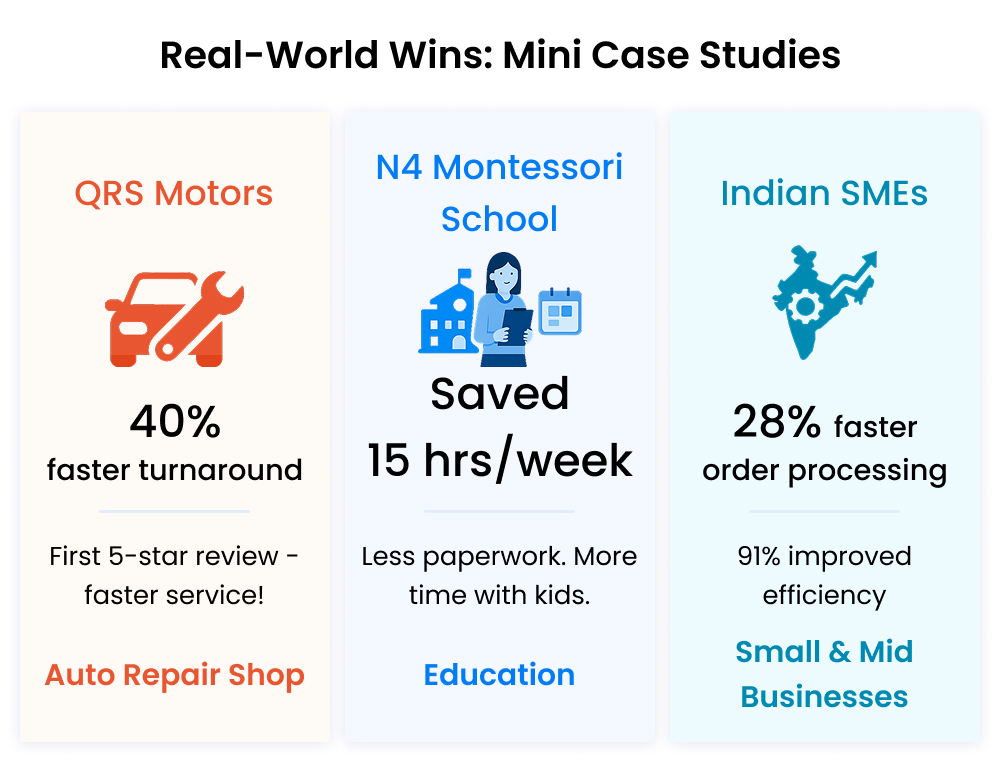
Here are three real case studies drawn directly from Jugl’s own customers and independent research that show how Jugl makes a tangible impact on operations, productivity, and customer satisfaction.
1. QRS Motors: From Chaotic Shop Floor to 5-Star Service
QRS Motors, a family-run auto repair shop, was grappling with missed job cards and unclear job statuses, leading to customer complaints and delayed deliveries.
After switching to Jugl’s integrated communication and task management platform, they digitized every work order, automatically assigned tasks to mechanics, and used real-time notifications to alert front-desk staff when a vehicle was ready for pickup.
Within two months, QRS Motors saw a 40% reduction in turnaround time and earned its first 5-star Google review, citing “seamless communication” and “faster service” as key drivers.
2. N4 Montessori School: Streamlining Education Administration
N4 Montessori School, a medium-sized preschool in the U.S., struggled with paper-based approvals and coordinating staff schedules for field trips and classroom changes.
By adopting JUGL as their online order management and work management app, They replaced paper forms with custom digital workflows and set automated reminders for permit submissions, bus bookings, and parent notifications.
That led to a 30% drop in administrative errors and saved faculty 15 hours per week, time they now devote back to student engagement rather than paperwork.
3. Indian SMEs: Quantified Impact from Independent Research
A recent peer-reviewed study surveyed 52 active Jugl users across Indian SMEs and found overwhelmingly positive outcomes:
91% of respondents agreed that Jugl’s task management software improved their operational efficiency, with mean ratings above 4.2 out of 5 on productivity metrics.
Strong positive correlations (r = 0.85) were recorded between Jugl’s workflow automation features and overall user satisfaction, underscoring automation’s role in driving adoption.
Companies reported an average 28% reduction in order processing time and a 25% decrease in manual errors within the first quarter of implementation.
Over 80% of users rated Jugl’s employee management software for SMB as “highly usable,” highlighting how intuitive design accelerates onboarding and minimizes training overhead.
Best Practices & Tips
Start small, iterate fast. Pick one high-impact process, like order approvals or picking lists, and automate it first. This lets you test how Jugl’s small business workflow automation tools work in your environment before scaling up.
Involve your frontline team. The people handling orders day-to-day know the pain points. Bring them into your workflow design sessions so your project management software for operations mirrors reality, not theory.
Use clear naming and tagging. In Jugl’s integrated communication and task management platform, consistent labels (e.g., “Urgent,” “Standard”) and tags help everyone filter and find tasks quickly, no more hunting through threads.
Schedule regular check-ins. Block 15 minutes each week to review your dashboards and spot new bottlenecks. A quick sync on Jugl keeps issues from piling up and ensures your team collaboration tool for order processing stays aligned with evolving business needs.
Leverage templates. Once a workflow is proven, save it as a template. This speeds rollout for new product lines, peak seasons, or holiday promos, helping you maintain that 2× order throughput without reinventing the wheel.
Measure and optimize. Set SLAs in Jugl, track them on custom reports, and celebrate wins when you hit targets. Continuous improvement is the name of the game, and with these tips, you’ll keep boosting productivity while your team stays engaged and error-free.
For teams looking to nail down robust task organization that complements your order workflows, "8 Task Management Tips for Business Owners That Actually Work" offers practical advice on setting clear priorities, using templates, and maintaining accountability across your staff.
That piece also includes a free template you can import into Jugl to kickstart your own streamlined task boards and ensure nothing ever slips through the cracks.
Process 2X More Orders Now
You’ve now seen how swapping manual handoffs for workflow automation for small businesses and centralizing every conversation and task in one work management app can help you process 2× more orders with the team you already have.
Jugl’s blend of task management, order management, and real-time chat means fewer errors, faster turnarounds, and happier customers.
Ready to see your own numbers skyrocket?
Ready to streamline your business operations?
Sign up for Jugl today and experience the future of business management! 🚀

Take Jugl for a spin, start a free trial today, and experience firsthand why it’s the all-in-one communication & work management platform businesses trust.
Get set up in minutes, map your first workflow, and watch your order volume and your bottom line take off.
Share this article
You might also like

How to stop losing orders and keep customers happy in 2025

Eduardo Amaya
7th Jan, 2025

Top 5 reasons why you should stop using Monday.com in 2025

Ram Kumar
7th Jan, 2025

Why 8 of 10 business owners are re-thinking service ticket management?

Arun Kumar
7th Jan, 2025